


How Does Uber Work at Sydney Airport?
- How to request an Uber after landing at Sydney Airport
- Where are Uber pick-up zones at T1, T2 and T3?
- How does the six-digit Uber PIN work at T1?
- How much does an Uber from Sydney Airport cost?
- Can you book an Uber before your flight lands?
- What if you cannot find your Uber driver or pick-up area?
- What should families and passengers with extra luggage know?
- Can you take an Uber to Sydney Airport for departure?
- Conclusion
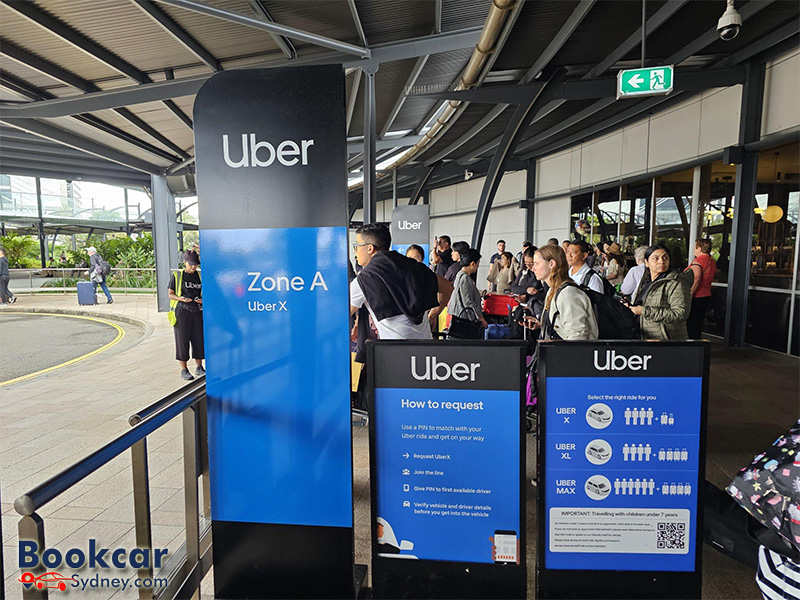
How to request an Uber after landing at Sydney Airport
Uber works through the usual app-based booking process at Sydney Airport: enter your destination, choose an available ride option, review the fare shown and follow the directions to the correct pick-up zone. The key difference from a typical street pick-up is that the airport has designated places where Uber vehicles can collect passengers.
- After landing, collect your checked baggage and complete any required immigration and customs procedures before arranging your pick-up.
- Open the Uber app, check that Sydney Airport and your actual arrival terminal are selected, and enter your destination.
- Choose the ride option that suits your group and luggage. Check the displayed price, any applicable fees and the proposed pick-up point before confirming.
- Follow the app’s “Directions to pickup” instructions and airport signs to your assigned zone.
- Use the matching process shown in the app, verify the vehicle and driver details, and only then get into the car.
Requesting the car once you are ready to leave the terminal can help avoid unnecessary waiting or cancellation charges. At T1, the process for UberX can involve a PIN instead of an individually assigned car.
Where are Uber pick-up zones at T1, T2 and T3?
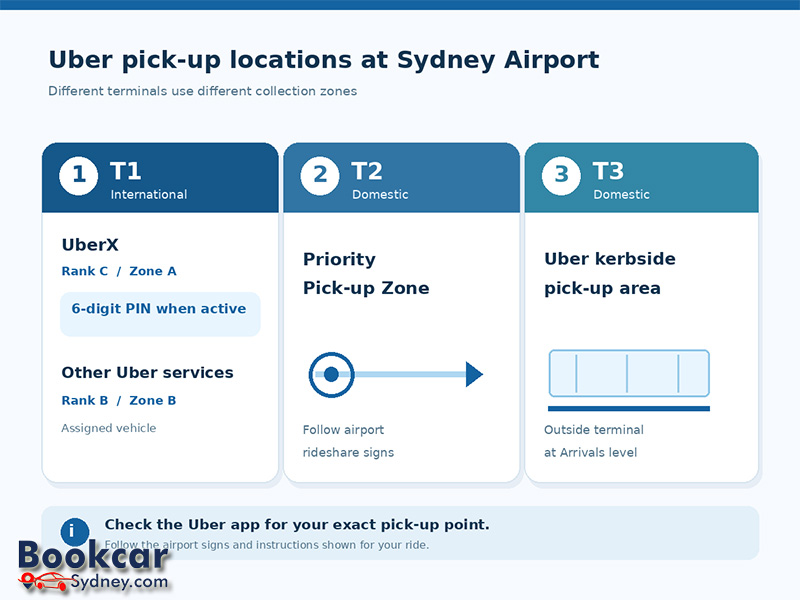
Sydney Airport has three passenger terminals, and Uber pick-up rules are not identical across them. The following is the general arrangement; the app and on-site signs take precedence if a location changes.
|
Arrival terminal |
Where to go |
How collection works |
|
T1 International |
UberX: Rank C / Zone A, close to Arrivals Hall B. Other Uber ride types: Rank B / Zone B. |
UberX uses a six-digit PIN when PIN collection is operating; other ride types generally use a designated vehicle. |
|
T2 Domestic |
Priority Pick-up Zone, reached by following the airport’s rideshare / priority pick-up signs. |
Meet the assigned driver at the location shown in the app; standard matching applies. |
|
T3 Domestic |
Dedicated Uber kerbside pick-up area directly outside T3 on the Arrivals level. |
Meet the assigned driver at the indicated kerbside location; standard matching applies. |
T1 International: near Arrivals Hall B
For UberX, head to Rank C, about 20 metres outside Arrivals Hall B. Uber identifies the UberX area as Zone A. Other Uber services, such as UberXL and premium options, use Rank B / Zone B and do not follow the same PIN collection procedure. If you exit from Arrivals Hall A, follow the Uber signs towards the pick-up area near Hall B. Airport staff and blue Uber signs can help you locate the correct bay.
T2 Domestic: Priority Pick-up Zone
T2 passengers generally walk to the designated Priority Pick-up Zone rather than being collected immediately outside the terminal doors. Follow the terminal signs and the walking route in the app. Do not assume that the nearby T3 kerbside Uber zone is the correct place for a T2 booking.
T3 Domestic: kerbside at Arrivals
T3 has a dedicated Uber pick-up area outside the terminal on the Arrivals level. Follow the blue Uber signage after leaving the terminal and check the location shown in your booking. This differs from the T2 Priority Pick-up Zone.
How does the six-digit Uber PIN work at T1?
The T1 UberX PIN system connects a passenger with an available UberX driver waiting at the dedicated pick-up area. Rather than searching for a particular pre-assigned vehicle, the passenger receives a unique six-digit code and provides it to the driver before boarding.
- Request UberX in the app while at T1 International and check whether the PIN collection process is active.
- Walk to the UberX area at Rank C / Zone A and join the passenger queue if one is operating.
- When directed to an available UberX car, provide the driver with the six-digit PIN before entering.
- Wait for the driver to confirm the code, then check the driver and vehicle information shown in the app before beginning the trip.
PIN collection is specific to eligible UberX pick-ups at T1 and operates during designated periods. Outside those periods, the app may use normal driver matching. UberXL, premium and other non-UberX products at T1 use a different zone and generally do not use the PIN queue. The booking screen is the best guide to the process that applies to your trip.
How much does an Uber from Sydney Airport cost?
There is no single fixed Uber fare for every journey from Sydney Airport. The price shown when you request a ride depends on the destination, ride type, expected route and travel time, demand, and applicable tolls or fees. It can change between searches, particularly during busy arrival periods.
Sydney Airport charges an access fee for Uber pick-ups, and Uber states that this fee is added automatically to the fare. Review the upfront price and trip details in the app before confirming rather than relying on a dated fare example. Waiting-time or cancellation charges may also apply depending on the circumstances and the terms shown for your booking.
UberX is one option, but the available selection may include larger or premium vehicles. If your party has several passengers and substantial luggage, check both seating and luggage capacity before choosing a more expensive or larger ride.
Can you book an Uber before your flight lands?
Uber Reserve may allow you to arrange an airport collection ahead of time, with reservations offered up to 90 days in advance for supported trips. When reserving, enter the correct flight and terminal details and check the price, arrival instructions, included waiting period and cancellation terms before confirming.
A reservation does not remove the need to reach the airport’s designated pick-up area. The specific meeting instructions for reserved trips can differ from those for an on-demand UberX PIN collection, so use the directions attached to your actual reservation. If you are not reserving, it is usually simpler to request your ride after baggage collection when you know you can reach the zone.
What if you cannot find your Uber driver or pick-up area?
Most airport pick-up problems arise from using the wrong terminal, the wrong vehicle category or the wrong collection zone. Before walking to another car park or road, check the trip details in the Uber app.
- Confirm whether you are at T1 International, T2 Domestic or T3 Domestic; these are separate pick-up areas.
- Check the selected Uber product. At T1, UberX PIN collection and other Uber products use different zones.
- Reopen “Directions to pickup” after requesting a ride, as your actual meeting point may be more specific than the general airport map.
- Contact the assigned driver through the app when standard matching is in use, or ask the airport’s ground transport staff for directions.
- Check the vehicle registration, make and model and driver profile before entering. Never accept an unsolicited off-app ride.
If you cannot reach the pick-up point safely or have booked from the wrong terminal, use the options shown in the app rather than asking the driver to stop in an unauthorised area.
What should families and passengers with extra luggage know?
Families with young children need to plan their restraint arrangements before travelling. In New South Wales, the child-restraint rules for rideshare vehicles are generally the same as those for private cars: children under seven must use an approved, suitable child restraint. Uber drivers are not guaranteed to have a child seat available. Bring a correctly fitted restraint or make suitable arrangements before booking; do not assume an ordinary Uber can legally carry a young child without one.
For multiple suitcases, bulky equipment or a larger group, review the vehicle options and capacity information in the app. A larger ride category may be appropriate, but vehicle availability and luggage space vary. Passengers with accessibility needs should review the accessibility options available for the selected trip and use the in-app help or booking information to confirm arrangements.
Can you take an Uber to Sydney Airport for departure?
Yes. Enter Sydney Airport as your destination and select the correct departure terminal based on your airline and flight details. Uber drop-offs are generally at the terminal kerbside, but the precise stopping point is governed by airport signs and traffic management. T1 International is separate from the domestic T2 and T3 terminals, so confirm the correct terminal before you leave.
Conclusion
Uber at Sydney Airport is straightforward once you know which pick-up system applies. Use the app to choose your ride and confirm the meeting point: T1 has separate UberX PIN and other Uber zones, T2 uses the Priority Pick-up Zone, and T3 offers a dedicated kerbside Uber area. Check the fare and airport fee, follow the terminal signage and verify the vehicle before boarding.
Latest Insights
- How to Get from Sydney Airport to the Cruise Terminal
- How to Get from Sydney Airport to Your Hotel
- Which Hotels Near Sydney Airport Offer Shuttle Services?
- Where to Stay Near Sydney Airport
- How Does Passenger Pick-Up and Drop-Off Work at Sydney Airport?
- Where Is Priority Pick-Up at Sydney Domestic Airport?
