


Where Is the Uber Pick-Up Point at Sydney Airport?
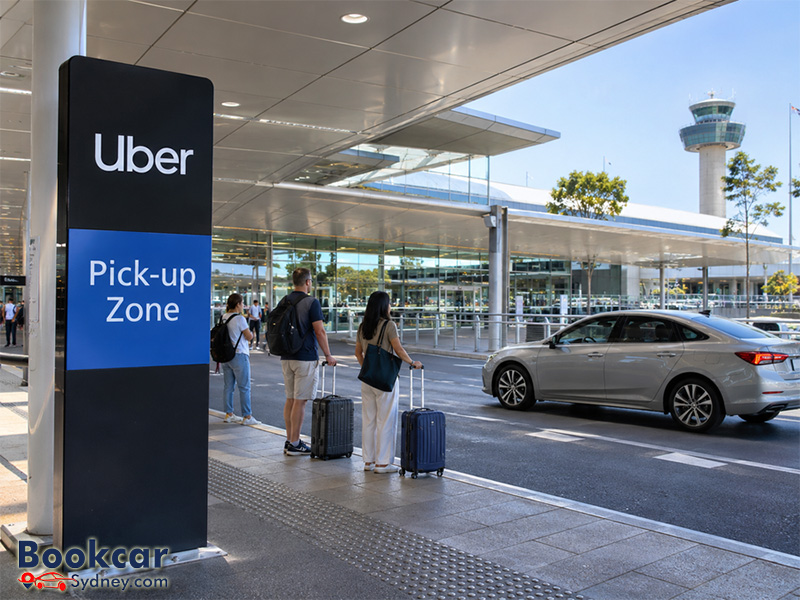
Uber pick-up locations at each Sydney Airport terminal
Sydney Airport has three passenger terminals, and there is no single Uber pick-up point for all arrivals. Check whether your flight lands at T1 International, T2 Domestic or T3 Domestic before following signs or booking your ride.
T1 International: UberX at Rank C; other Uber rides at Rank B
At Terminal 1, Uber pick-ups are close to the international arrivals exit. Sydney Airport places UberX at Rank C, approximately 20 metres outside Arrivals Hall B. Uber also refers to the UberX pick-up area as Zone A in its directions.
Other Uber options, including UberXL, Uber Green and premium services, use dedicated bays at Rank B, which Uber describes as Zone B. Your exact instructions depend on the product you select in the app.
If you come out through Arrivals Hall A, turn left after exiting the terminal and follow the signs for Uber. Continue to the pick-up area indicated in your app rather than joining a taxi queue or walking to a general parking area.
T2 Domestic: Priority Pick-up
For most Uber rides from Terminal 2, head to the Priority Pick-up Zone. From baggage reclaim and the arrivals exit, follow the green Priority Pick-up signage and lighting towards the designated collection area. This is separate from the Express Pick-up Zone used for general passenger collection.
An exception applies to Uber Premier: Uber identifies the designated kerbside Limo Pick-up area for that product at T2. Check the location shown for your selected ride type rather than assuming every Uber booking uses Priority Pick-up.
T3 Domestic: Uber kerbside outside Arrivals
Terminal 3 has a dedicated Uber pick-up zone at the kerb, directly outside the terminal on the Arrivals level. Follow the signs for Uber after collecting your bags and leaving the terminal.
If you exit beside the taxi rank, turn left and continue along the kerb past the rank until you reach the Uber pick-up area. T3 passengers do not normally need to walk to the T2 Priority Pick-up Zone to meet an Uber.
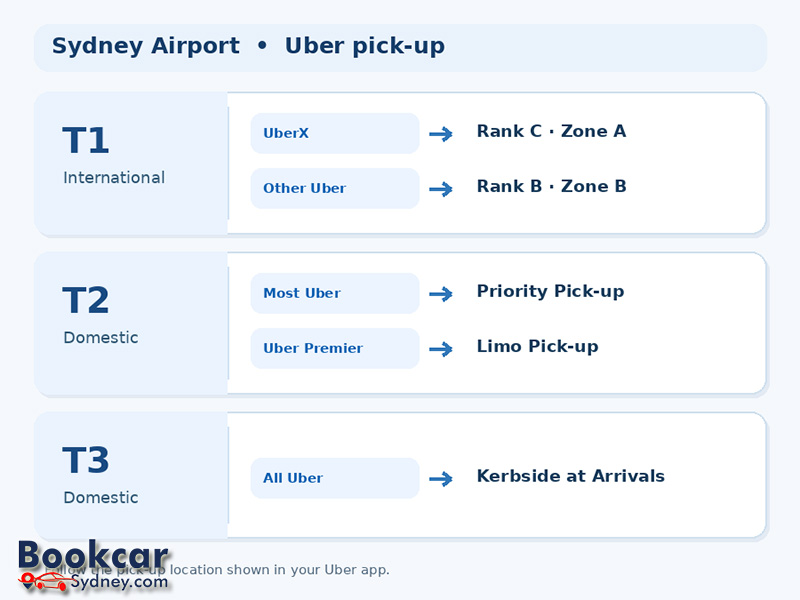
How to find your Uber driver after landing
The terminal signs will get you close, but the Uber app provides the most useful final directions for your particular booking.
- Confirm your terminal. Identify T1, T2 or T3 on your flight information and follow signs towards baggage reclaim and Arrivals.
- Collect your luggage before requesting. This reduces the chance of a driver arriving while you are still inside the terminal.
- Choose your ride type in the Uber app. Different products can have different pick-up zones, especially at T1 and T2.
- Open “Directions to pickup” after you request the ride. Follow the app’s current instructions, along with airport signs and any directions from staff.
- Go to the specified zone and use the booking details to meet your driver. If you cannot locate the correct area, message or call the driver through the app.
Do not rely solely on a saved map or an old screenshot. Road access, construction and airport operating arrangements can change, so the location attached to your live booking takes priority.
How the UberX PIN system works at T1 International
For T1 UberX pick-ups during PIN operating hours, the app provides a six-digit PIN after you request the trip. At the designated UberX queue, give that code to the first available UberX driver before getting into the car. The driver enters it to match your ride.
Uber states that PIN pick-up operates at T1 from 6 am to 10 pm daily. Outside those hours, the normal UberX trip-matching process applies. Other Uber products at T1 use assigned vehicles rather than the UberX PIN queue.
If your booking shows a named driver and vehicle, check the details displayed in the app before boarding. If it shows a PIN pick-up, follow the PIN instructions instead. Airport and Uber staff can direct you to the appropriate queue.
Priority, Express and kerbside pick-up are not the same
The airport uses several similar-sounding names for passenger collection areas. Choosing the wrong one can mean an unnecessary walk or a missed driver.
- Priority Pick-up: the usual Uber meeting area for passengers arriving at T2 Domestic; it is also used by other rideshare services.
- Express Pick-up: a separate public passenger collection area in the domestic precinct, not the standard T2 Uber meeting point.
- Uber kerbside: the dedicated Uber area just outside T3 Arrivals, as well as the Uber-specific ranks beside T1 International.
- Taxi ranks: separate areas for taxis; they are not interchangeable with Uber meeting points.
For a booked Uber, follow the pick-up zone tied to the request rather than whichever collection sign you see first.
Useful tips before you request a ride
- Keep the Uber app open and make sure your phone has enough battery and mobile data to view directions and messages.
- Wait until your group and luggage are ready, particularly if you have checked bags or are arriving on an international flight.
- Choose a vehicle size that suits your passengers and luggage. Vehicle space varies, so confirm anything unusual with your driver after matching.
- Check the quoted fare before requesting. Uber states that a Sydney Airport access fee applies to pick-ups and is added automatically to the fare.
- If the driver or pick-up instructions appear different from what you expected, use the in-app contact options and follow current airport staff directions.
Latest Insights
- How to Get to and from Sydney Domestic Airport
- Where to Drop Off Passengers at Sydney Domestic Airport
- Where Is the Drop-Off Area at Sydney Airport Terminal 2?
- Where Is the Drop-Off Area at Sydney International Airport?
- Where to Drop Off Passengers at Sydney Airport
- Where Are the Taxi Ranks at Sydney Airport?
