


How to Connect to Free Wi-Fi at Sydney Airport
How to connect to Sydney Airport’s free Wi-Fi
You can connect using a Wi-Fi-enabled phone, tablet or laptop. The airport uses an on-screen access page, so selecting the network is only the first step.
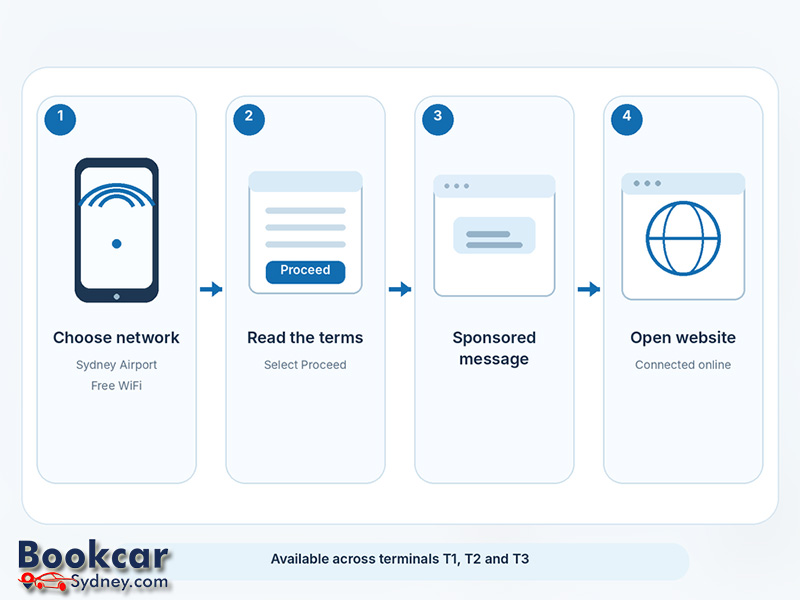
- Turn on Wi-Fi in your device’s settings while you are inside the airport terminal.
- Select “Sydney Airport Free WiFi” from the available wireless networks. Check the name carefully rather than choosing a similar-looking hotspot.
- Wait for the network’s welcome or sign-in page to appear. If it does not open automatically, launch your web browser.
- Answer any questions displayed, read the terms and conditions, and select “Proceed”.
- You will see a sponsored message before being redirected to a website. Once the process finishes, test the connection by opening a webpage.
These are the connection steps described by Sydney Airport. The wording or appearance of the sign-in page may vary by device.
Where is the free network available?
Sydney Airport says free Wi-Fi is available across all three passenger terminals: T1 International, T2 Domestic and T3 Domestic. The same official network name applies whether you are catching an international flight or travelling within Australia.
Coverage is described as available throughout the terminals, but that does not guarantee a reliable signal in car parks, on surrounding roads or during a journey between terminals. If you move to another terminal and lose the connection, open Wi-Fi settings and reconnect.
What if the Wi-Fi login page does not open?
A device may show that it is connected to Wi-Fi even though the airport’s access page has not finished loading. Try these steps in order:
- Disconnect from the network, then select “Sydney Airport Free WiFi” again.
- Switch Wi-Fi off and on, then reopen your browser. Visiting a normal, non-sensitive webpage may prompt the sign-in page to appear.
- If a VPN, private DNS setting or security app is preventing the sign-in page from loading, temporarily adjust that setting only long enough to complete the airport’s access process; restore your protections afterwards.
- If the network still does not appear, move to another public area of the terminal and try again.
If access stops after you have been online for a while, reconnect and check whether the terms or welcome screen needs to be completed again.
Is Sydney Airport’s public Wi-Fi secure?
Sydney Airport states that its free public Wi-Fi is unencrypted. That means the Wi-Fi connection itself does not provide the protection of a private, encrypted wireless network, even though secure websites and apps can encrypt their own traffic.
Use HTTPS websites and keep your device updated. Avoid entering sensitive financial or account details on an unfamiliar page, and consider mobile data or a trusted VPN for activities that require greater privacy. Never assume that a network is genuine solely because its name looks official.
Are there time limits or usage restrictions?
The service is free, but “free” does not mean guaranteed uninterrupted access. Sydney Airport’s Wi-Fi terms allow sessions to end after inactivity, on leaving the airport or when a session time limit is reached. The terms do not promise a fixed unlimited session length.
The airport can also restrict access for operational, safety or security reasons, and says the service is not intended for continuous connectivity or large downloads. For essential travel updates, keep a backup option such as mobile data where available.
