


Checking the Status of a Sydney Airport Flight
How to check a flight on the Sydney Airport website
The fastest starting point is the official Sydney Airport flight listing. It covers arrivals and departures, with separate views for domestic and international services.
Open Sydney Airport’s flight listing and follow these steps:
- Select Arrivals or Departures, then choose Domestic or International to match your flight.
- Choose the correct flight date. A flight shortly after midnight may be listed under a different date from the one you expect.
- Enter the flight number, city or airline in the search field. A flight number is usually the most precise way to find a particular service.
- Check that the route, airline and terminal match your itinerary, then compare the Scheduled, Estimated and Status fields.
Where offered, you can open a flight’s details or use the “Stay updated” option. The airport advises checking terminal flight information screens for regular updates because online information is not guaranteed to be perfectly accurate or timely.
What the flight status and times mean
A status label is useful, but the two time fields often tell you more about the size of a change. Read them together rather than relying on a single word.
|
Field or status |
How to interpret it |
|
Scheduled |
The published departure or arrival time for the flight. |
|
Estimated |
The latest expected time where an estimate is available. It may change again. |
|
On time |
No delay is currently indicated; this is not a guarantee that the flight will operate exactly to schedule. |
|
Delayed / expected later |
The timing has changed or is expected to change. Compare the current estimate with the scheduled time. |
|
Cancelled |
The listed service is not going ahead as scheduled. Contact the operating airline about your booking and options. |
|
Departed / arrived |
The aircraft has left or reached its destination. For arrivals, landing does not mean passengers are ready to leave the terminal. |
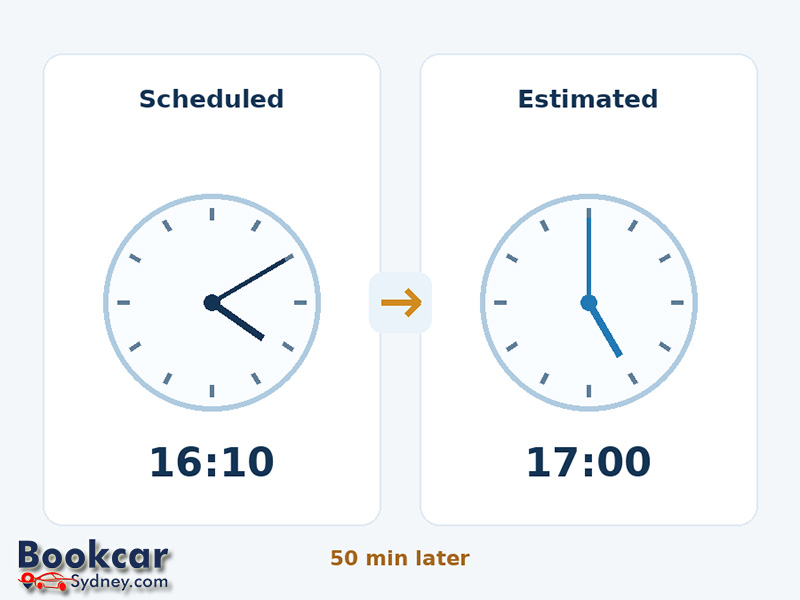
For example, if a departure is scheduled for 16:10 but estimated at 17:00, the current estimate is 50 minutes later. That is a planning update, not a firm promise of a 17:00 departure. The exact wording of status labels can vary between the airport and airlines.
Confirm disruption details with the operating airline
Sydney Airport’s listing helps you identify a change; the airline operating the service is the better point of contact for instructions affecting your booking, including a confirmed cancellation, rebooking or other disruption arrangements.
For example, check Qantas flight status for Qantas-operated services, or Virgin Australia flight status for Virgin Australia services. Other airlines provide their own flight-status or manage-booking pages.
Be particularly careful with codeshare flights. Your ticket may show one airline’s flight number even though another airline operates the aircraft. Qantas specifically directs travellers on non-Qantas-operated flights to the operating airline and notes that codeshare information can take longer to update.
If you are travelling, keep your contact details current in your airline booking and check airline messages or app notifications. Do not assume an airport status update has automatically changed your ticket or check-in arrangements.
What to do if the flight is delayed or cancelled
If you are departing from Sydney
Recheck the flight status and your airline’s messages before travelling. If the departure is delayed, follow the airline’s check-in and boarding instructions rather than assuming the original deadlines have moved. For a cancellation, use the operating airline’s manage-booking or disruption support channels to confirm available alternatives and any applicable refund or credit options.
If you are meeting an arriving passenger
Track the arriving flight number and its estimated arrival time before setting off. After the aircraft lands, passengers may still need time to disembark, collect luggage and, for international arrivals, complete border processes. Agree on a meeting point and allow for that difference rather than treating the landing time as the pick-up time.
If a flight delay affects an arranged airport pick-up, pass the updated flight number and estimated time to whoever is collecting the traveller. A flight-status page can help you coordinate, but it does not confirm another company’s pick-up policies.
Why the status can change — and when to check again
Flight estimates can change because of weather, air traffic conditions, aircraft or crew availability, or other operational issues. An aircraft may be delayed earlier in the day and affect a later service even when conditions in Sydney appear normal.
Check once when planning the journey, again before leaving for the airport, and once more closer to the scheduled arrival or departure. While inside the terminal, follow the flight information screens and airline announcements for current gate and boarding instructions. Times shown for Sydney flights should be interpreted in the local time applicable to the flight listing.
If you cannot find the flight
Start by checking the travel date and whether you selected arrivals or departures and domestic or international. Try the flight number without spaces, or search by airline and origin or destination. If you booked a codeshare, try the operating airline’s flight number as well.
A flight may also be outside the period displayed by a particular flight-status tool. For example, Virgin Australia says its flight-status information is available from 48 hours before departure until 72 hours after arrival. If the flight still does not appear, check the operating airline’s booking or flight-status service rather than assuming it has been cancelled.
