


Finding Sydney Airport Flight Schedules
Where to find the official Sydney Airport timetable
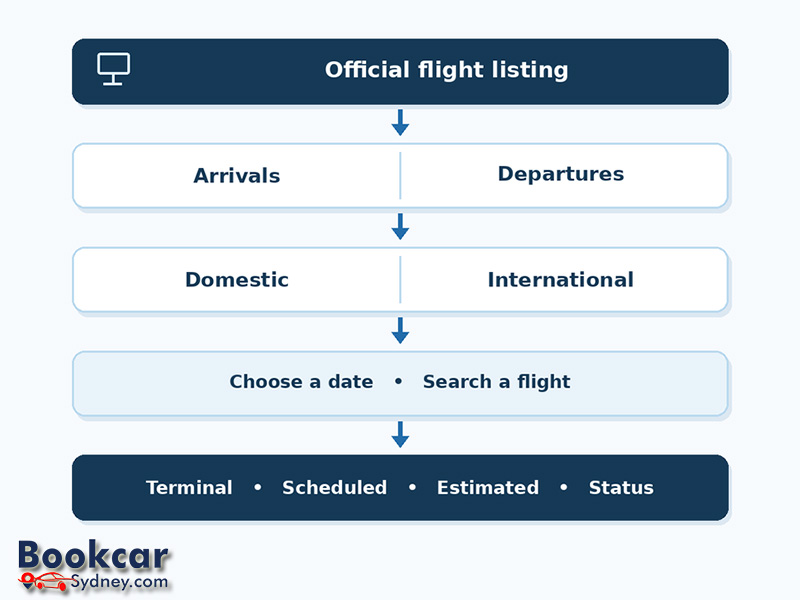
The first place to check is Sydney Airport’s official flight listing. It brings arrivals and departures together in one searchable list for Sydney Airport (airport code SYD). You can switch between domestic and international flights, select an available date and look up an airline, city or flight number.
The list identifies the flight, relevant terminal and scheduled time. As the travel date approaches, it can also display an estimated time and a status update. This makes it useful both for checking the published plan and for spotting changes on the day.
The airport’s date selector is designed for the dates it makes available on the flight-listing page, rather than as a complete long-range airline timetable. If your intended travel date is not offered, check the airline’s timetable or flight search instead.
How to look up a planned arrival or departure
- Open the official Sydney Airport flight listing.
- Choose Arrivals if a flight is landing in Sydney, or Departures if it is leaving Sydney.
- Select Domestic or International, then choose the relevant date from those available.
- Search by flight number, city or airline, or browse the list in scheduled-time order.
- Check the scheduled time, flight number and terminal. Recheck the estimated time and status closer to travel.
For arrivals, the city shown is the flight’s origin; for departures, it is the destination. If several flights serve the same city, the flight number is the clearest way to match the correct service. An airline name alone may return several results.
Travelling on a codeshare? Your booking may show a different airline’s flight number from the one operating the aircraft. Check the operating carrier and match the flight number or flight details before assuming that a listing is missing.
Scheduled, estimated and actual flight information
A timetable is a plan, not a guarantee of when an aircraft will take off or land. Sydney Airport’s flight list separates the published schedule from updated operational information when that information is available.
|
Field |
What it tells you |
|
Scheduled |
The published arrival or departure time for the flight. |
|
Estimated |
A revised expected time, when an updated estimate is available. |
|
Status |
The current reported stage of the flight, such as a delay, departure or arrival. |
|
Terminal |
The terminal associated with the listed flight; check again before travelling. |
For example, a flight can retain its original scheduled arrival time while its estimated arrival changes after a delay. If you are meeting someone, the updated arrival information is more useful than relying on the timetable alone. An arrival time also does not tell you exactly when a passenger will reach the public arrivals area.
Sydney flight times should be read in the local time of the relevant airport. Sydney uses Australian Eastern Standard Time (AEST) outside daylight saving and Australian Eastern Daylight Time (AEDT) during daylight saving. When comparing a Sydney arrival with an overseas departure, check the date and time zone at both ends of the journey.
Where to check flight schedules further in advance
For a journey weeks or months away, use the operating airline’s own timetable or booking search. Enter the route and travel date to see the services the airline currently plans to offer. The airline is also the appropriate place to confirm a booked itinerary and receive information about schedule changes.
For example, the Qantas timetable page provides timetable information for Qantas, QantasLink, Jetstar and codeshare services. For another carrier, use that airline’s official timetable or flight-search function.
A published route schedule is not the same as a confirmed booking: a service may operate only on certain days, and flight times, operating airlines or services can change. If you already have a ticket, your latest booking confirmation and the operating airline’s updates take precedence over an older copy of a timetable.
Check the terminal and the day before travelling
Sydney Airport uses T1 for international flights and T2 and T3 for domestic flights. The relevant terminal is shown in the airport flight listing, but you should still verify the details for your particular flight. Do not assume that every domestic airline uses the same terminal.
Before leaving for the airport, confirm the airline’s latest departure or arrival information, especially if the flight has changed time or a disruption is affecting operations. Once inside the terminal, use the flight information screens for the latest on-site updates; Sydney Airport also advises travellers that its website information may not always be timely or accurate.
Keep the airport code in mind as well. Sydney Airport (SYD) and Western Sydney International (WSI) are separate airports. A flight scheduled for one should not be treated as a flight at the other.
